24-hour locksmith and lock replacement hotline
Call 24h hotline WhatsApp enquiry

Philips 702E fault · real before / after case photos

Philips digital lock replacement to mechanical lock

Is your Philips digital lock failing again? Philips 702E users often contact 101 Locksmith when the handle or lock body makes a motor sound, but the three horizontal bolts do not extend and the door cannot be locked.

One customer described it as: “Luckily I noticed before leaving. Otherwise the flat would have been left completely unsecured.” If the brand hotline cannot handle the issue immediately, or the reply is replacement only, some users prefer to return to a physical key and mechanical lock.

The key question is not just whether a lock can be fitted. It is whether the old digital-lock holes can be covered after removal. We need photos of the outside, inside, door edge and strike position before giving a reliable initial answer.

Photos help us check whether a long faceplate can cover the old holes and provide a quotation.

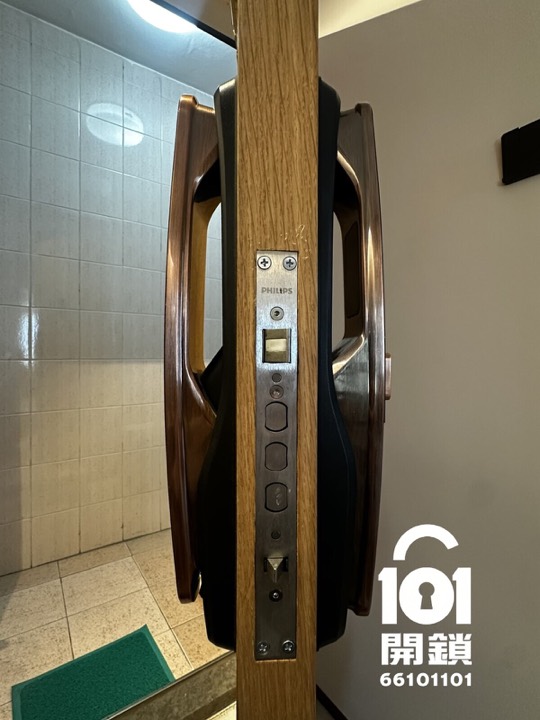
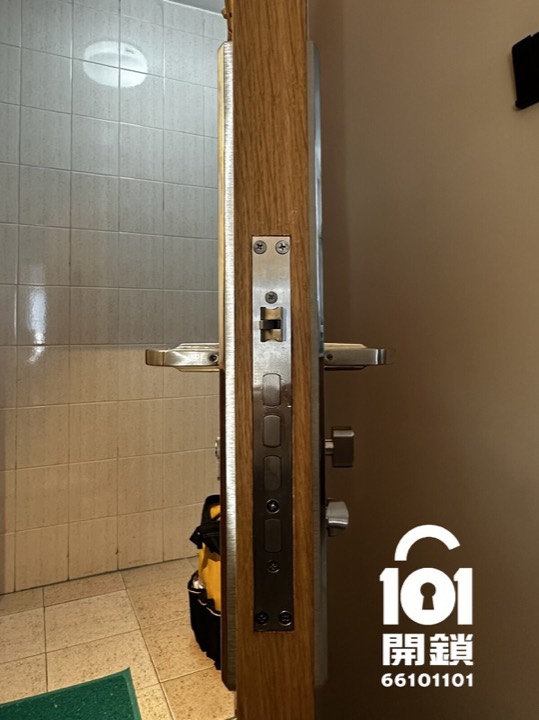
Door-edge lock body before replacing the Philips digital lock
Before: digital-lock body and door edge
Door-edge lock body after replacement with a mechanical lock
After: mechanical lock body installed

Real evidence: before and after photos from the same case

The photos show the outside panel, inside panel and door-edge lock body. This is more useful than product photos alone because it shows the visible result after installation.

Outside: digital-lock panel → mechanical-lock panel

The long mechanical-lock faceplate covered the original digital-lock panel area in this case.

Outside panel before replacing the Philips digital lock
Before · outside
Outside panel after replacing the Philips digital lock with a mechanical lock
After · outside

Inside: digital-lock panel → mechanical-lock panel

The inside long faceplate was also checked against the original hole positions.

Inside panel before replacement
Before · inside
Inside panel after replacement
After · inside
Evidence from this case: The before and after photos show that a longer faceplate was used to complete the conversion. On this door, the former digital-lock area was covered without additional door-surface repair, reducing the risk of colour mismatch after patching.

Can the old holes be covered?

The answer depends on the actual door, lock body and previous drilling positions. We check the visible evidence first instead of promising based on brand name alone.

Door conditionLikely handlingWhat to confirm
Higher chance of coveringThe old holes fall within the new long faceplate area.Outside and inside panel height, screw-hole spread, door-edge lock-body size.
Need on-site confirmationSome holes, marks or frame positions are close to the edge of the new faceplate.Door thickness, backset, lock centre, opening direction and strike alignment.
May need repairOld holes, dents or surface damage extend beyond the faceplate coverage.Whether patching, touch-up or other door repair is included in the quotation.

Photos provide an initial assessment only. Final suitability is subject to the actual door and lock condition on site.

If a digital lock fails: repair, replace, or return to mechanical?

“Failed” and “no longer want to use it” are different needs. Do not assume removal is required for every battery or single-fault issue.

Fault / cannot enter

Diagnose, unlock or repair first

Suitable when the digital lock is not operating correctly or you cannot enter the property.

  • Check the model’s backup key or external power option where applicable.
  • Priority is access and immediate safety.
  • Do not jump directly to mechanical conversion without diagnosis.
Still want digital functions

Replace with a new digital lock

Suitable if the household still needs PIN, fingerprint or remote functions.

  • Compare panel coverage, backup methods and warranty.
  • Check compatibility between old holes and the new panel.
  • Review daily habits and battery-management expectations.
Prefer physical keys

Return to a mechanical lock

Suitable if you clearly no longer want electronic functions and accept active key locking.

  • Check hole positions, lock body and final appearance.
  • Understand the trade-off: no auto-lock, but you must lock with a key when leaving.
  • Confirm total cost and whether surface repair is needed.

Send four photos for a reliable first answer

Send the outside, inside, door-edge lock body and strike position. If possible, also provide the digital-lock brand/model, door thickness and district. Avoid showing key cuts or address details.

The mechanical lock used in this case: what it proves and what it does not

The following details are confirmed from this case. Suitability for your door should not be inferred from brand name or this case alone.

  • Front faceplate: approx. 450 mm × 70 mm long faceplate.
  • Lock body marking: 240 mm × 24 mm.
  • Finish: satin silver stainless-steel panel.
  • Keys: usually supplied with 5 new keys. If choosing an A+B / master-key arrangement, confirm the number of keys, who holds each key type, duplication rules and future management with us first.
  • After-sales: 14-day installation after-sales support from completion date, covering installation issues. It does not include lockout service for lost keys, misuse, human damage or external-force damage.
Confirm before installation

Not sure whether your door is suitable?

Send door photos for a first compatibility assessment. We confirm the lock body, hole positions and door type before arranging installation, avoiding unnecessary door work.

Send outside / door-edge / inside photos Check lock distance, hole positions and door type Arrange on-site installation after confirmation

Check compatibility before work

WhatsApp photo assessment Call 66 101 101

Photos help with initial communication. The final plan depends on the actual door and lock condition on site.