
Use a matched set
When the model uses replaceable cells, install new batteries of the same specified type and place the polarity correctly. Do not mix new and old cells, brands or chemistries.
Hong Kong digital lock guide
Before replacing a battery or trying an emergency power method, check the lock's brand, full model number and manufacturer instructions.
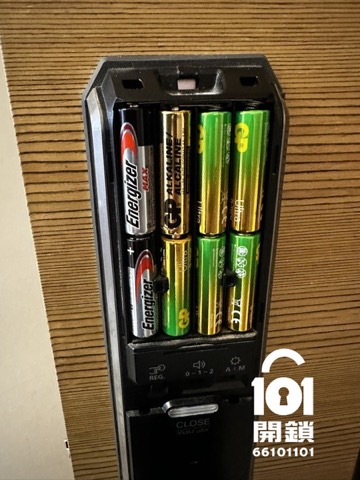
Check the battery compartment and the official manual first. Digital locks can use AA batteries, rechargeable battery packs or built-in lithium batteries. Do not substitute a different chemistry, voltage or charging method simply because another lock uses it.
Record the model and replace the battery according to the manufacturer’s instructions while the lock can still be opened normally. A fixed six-month replacement interval and a fixed number of remaining operations are not universal specifications.
When the model uses replaceable cells, install new batteries of the same specified type and place the polarity correctly. Do not mix new and old cells, brands or chemistries.
Know whether the model has a mechanical key, 9V contacts or another official emergency method before a low-battery warning becomes urgent.
A slow motor, repeated alerts or a lock that still fails after compatible batteries are fitted needs diagnosis; do not repeatedly dismantle or power an unknown port.
Find the official procedure for your exact model. Some locks use a key, 9V contacts or specified USB/Type-C emergency power, but the port, voltage and sequence are not interchangeable.
At battery replacement, take a moment to inspect the battery, terminals and springs.
Based on our 2025–2026 repair records, enquiries involving Samsung models appear more frequently. This does not demonstrate a higher overall failure rate: installed volume, model mix and product age in Hong Kong can affect the number of enquiries.
Use only the official emergency method for the exact model. Do not assume that a USB power bank works for every lock.
No. Battery life depends on the model, battery type, features, use frequency and manufacturer guidance.
Check compatibility, polarity, battery cover and any model-specific start-up procedure. If the fault remains, record the symptoms and arrange inspection.
Use the latest documentation for your own model for actual operation.
Check the model first
Join the WhatsApp group and send the brand, full model number, lock photos and battery-compartment photo. The locksmith team can give an initial response.